) "Office Depott & OfficeMax")
) "Office Depott & OfficeMax")
 Sign up for
Store Pickup Monitors & Accessories






Related Products

TUF VG328H1B 32" Class Full HD Curved Screen

Asus ProArt PA278QV 27" WQHD LCD Monitor

Asus BE24EQK 24" Class Webcam Full HD LCD

Asus ZenScreen MB16ACE 16" Class Full HD LCD
Monitors and digital signage can help convey important information to colleagues and clients. With a wide array of sizes and resolutions available, you'll be sure to find an LCD monitor or LED monitor with appropriate risers or monitor stands to suit your needs. Digital signage can help promote your brand and business in just about any location, from inside the office to retail locations with a high amount of foot traffic where casual passersby can see everything your company has to offer.
Monitors
If you're looking for a new computer monitor, considering the tasks it will be used for is a great place to start. An LED monitor will generate vivid and accurate colors that are essential for photo and video editing. LEDs are also generally slimmer, making them more suitable for areas where space is limited. The HP Laptop Touch Screen offers LED backlighting, which permits a thinner and more energy-efficient screen. When a single image must be displayed for extended periods, LCD monitors help guard against screen damage. There are also a wide range of resolutions available. Choose a lower resolution for basic tasks, such as editing text documents or creating spreadsheets, and opt for a higher resolution when intense visual clarity is required.
Digital Signage
Promoting your brand and company can be an easy way to help expand and grow a business. Strategically placed digital signage attracts the attention of potential clients and creates an engaging way to showcase goods and other offerings. An all-in-one design with a built-in television tuned in to the big game can help maintain interest while advertisements play on the side, and interactive touch screens make it easy and engaging for people to find out more information about specific products and services.
Monitor Mounts and Arms
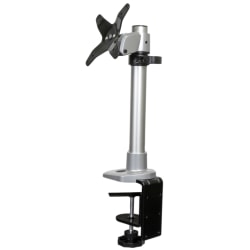
Employees spend a lot of time working on monitors, and if monitors are positioned too high or too low it can result in frustrating neck strain and sore, tired shoulders. Place monitors on mounts or extendable arms to keep on-screen data even with the user's eyes. Choose a dual-monitor mount for environments that often require people to work on two screens at the same time.